How do I check if my MP3 to MIDI conversion is accurate?
Line up the MP3 and MIDI at the same start point. Compare the note count, pitch order and start times before you quantize. Start with one short phrase so you can hear and locate each mismatch.
Download the test filesTry it with a 16-note test
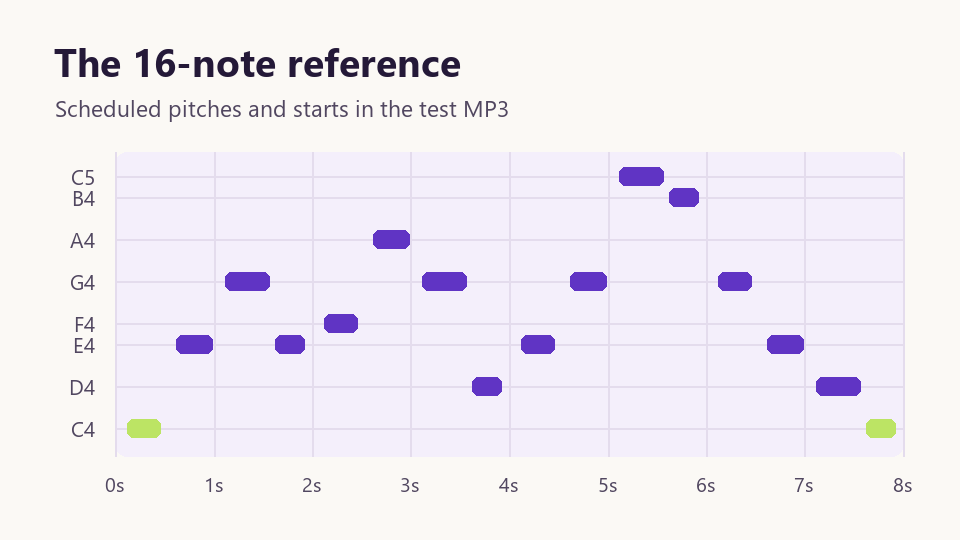
Download the test MP3 and run it through the MP3 to MIDI converter. Then compare your result with the MIDI from our test. The source is a synthesized melody with 16 known pitches and scheduled starts. The first note begins 120 milliseconds into the recording.
In a Windows Chrome test, Noteline found all 16 notes in the expected pitch order. The largest start-time difference from the synthesis schedule was about 5.4 milliseconds. That measurement applies to this clip. You can inspect the complete sequence in the reference CSV.
To reproduce the timing check, compare the C4 at each end of the recording. The reference places them at 0.120 and 7.620 seconds. Reading the downloaded MIDI at its embedded tempo gives 0.115 and 7.615 seconds, rounded to three decimals. Both starts are slightly early by the same amount. The elapsed time between them is 7.500 seconds in both files.
For a pitch check, skip to the highest note in the reference. It is the eleventh attack, MIDI note 72, scheduled at 5.120 seconds. The converted file has note 72 at 5.115 seconds. Checking a high note as well as the opening pitch catches a one-off octave jump that a simple note count would miss.
Compare three things in this order
1. Did the conversion miss or add a note?
Loop the first four attacks and count them against the first four MIDI blocks. The test plays C4, E4, G4 and E4. If the count is off, zoom into the first mismatch. Two short blocks where you hear one attack point to a split note. A blank space at an audible attack points to a missing note.
2. Are the pitches in the right octave?
Compare note names or use MIDI note numbers when editors label octaves differently. The first test pitch is MIDI note 60. A reading of 72 at the same attack is one octave higher. Check the nearby notes before transposing the entire clip.
3. Is the offset constant or growing?
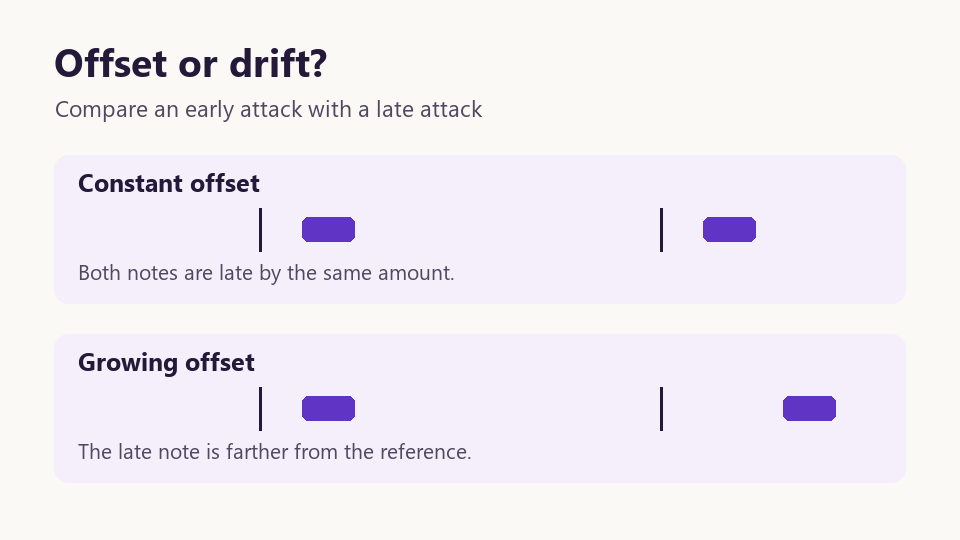
Switch to elapsed seconds and compare an early attack with one near the end. The first and last starts in this clip are 0.120 and 7.620 seconds. If both starts are late by roughly the same amount, check clip placement. If the late note is farther off than the early one, check the project tempo and any stretch or warp settings before adjusting individual notes.
Questions that come up during the check
Why are all my notes shifted after import?
Check whether your editor snapped the MIDI clip to a different start point or trimmed the opening silence. For this test, place both clips at the same origin and look for the first C4 at roughly 0.120 seconds.
Can I use the same check on a full song?
Use it on one exposed melody or a single stem at a time. In a busy mix, write down which part you expect to hear before counting notes. Noteline tracks the dominant pitch, so overlapping instruments can change which note it follows.