Why did one bass note become two MIDI notes?
Listen for a second strike in the original bass. A sustained note can become two MIDI notes if it gets very quiet and then returns. In our test, that dip made a held A1 produce the same MIDI events as an A1 played twice. Keep both notes if you hear a separate strike. Join them if you know the dip was part of one held note.
Download the two audio clipsOne held note, two matching MIDI exports
We synthesized a 55 Hz A1, MIDI note 33, with a second harmonic. The held control ran from 120 to 1,120 milliseconds. In a copy, we dipped its amplitude around 610 milliseconds while keeping the oscillator phase continuous. We also built a separate clip with two attacks and 80 milliseconds between the first note ending and the second starting.
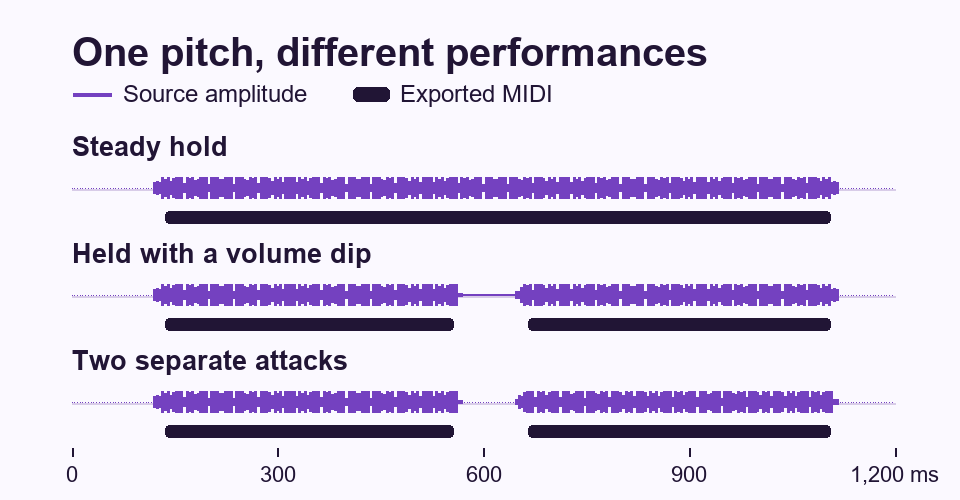
The steady A1 exported as one note from 135.4 to 1,105.2 milliseconds. A second held control with a brief volume swell at 610 milliseconds also exported those same boundaries. In this test the swell alone left the held note intact.
The held note with the deep dip ended its first MIDI event at 555.2 milliseconds and started a second at 664.6 milliseconds. Both events were A1 and both had MIDI velocity 120. The true repeat with the 80 millisecond input gap produced those same fields on both notes.
The repeat with zero added silence still became two notes. Its first synthesized note faded out as the next faded in. The exported MIDI left about 30 milliseconds between the bars. So an empty space in the piano roll can be longer than the silence programmed into the source.
In the WAV repeats with 10, 20, 40, and 80 milliseconds of input gap, the second MIDI notes started at 594.8, 605.2, 625.0, and 664.6 milliseconds. All four first notes ended at 555.2 milliseconds. On these clips, the edit point at the left of the second note moved while the right edge of the first stayed put.
The first note in every repeat ended about 15 milliseconds earlier in MIDI than in the synthesized input. The second note started about 15 milliseconds later than the new attack. Both edges widened the exported gap, so moving only the second note back to its source onset would correct about half of the extra space.
We also encoded five inputs as 64 kbps MP3: the steady hold, the hold with a dip, and the repeats with 20, 40, and 80 millisecond gaps. Each MP3 gave the same note events as its own WAV. For each pair, the CSV lets you check pitch, both boundaries, and velocity side by side.
Hear the difference and compare files
- One held A1 with a dip (MP3)
- Two A1 attacks, 80 ms apart from release to onset (MP3)
- Shared MIDI output and note events for all 13 inputs (CSV)
Import both clips on separate audio tracks with the same start point, then put the shared MIDI on a third track. Compare the returning sound near 0.65 seconds while switching between the audio tracks. When the two recordings are unfamiliar, their identical MIDI geometry leaves you with the original audio as the deciding evidence.
Which MIDI notes should you join?
In your own session, line up the start of the MIDI phrase with the original audio before inspecting the suspected split. Zoom into the second note's start with audio playback slowed down if needed. Listen for the sound of a string or synth actually being triggered again and check it against the waveform.
For a confirmed hold, keep the first onset and extend that MIDI note to the end of the second event. Delete the extra event. Play over the edit with an instrument that has a sharp attack so you can hear whether the unwanted second trigger is gone.
For a confirmed repeat, keep both note starts. If the gap sounds too wide, adjust the first note's end against the audio before moving the second note's start. In the zero-added-gap example, closing the space by deleting the second event would remove an actual attack.
These results describe short synthesized A1 clips in the Noteline MP3 to MIDI converter. A recorded bass, a mixed track, or a different converter can behave differently. If the original recording leaves the second attack unclear, keep a copy of the raw MIDI before editing.
For a broader pass, see how to check MP3 to MIDI note accuracy.