Does WAV give you better MIDI than MP3?
Use the original WAV if you have it. If you only have an MP3, try converting it directly. In this Noteline test, one WAV, two MP3 encodes and a WAV decoded from the smaller MP3 all produced byte-for-byte identical MIDI.
Download the comparison filesWhat changed in the test
We used a single 16-note synthesized melody with known pitches and start times. Its original was a mono PCM WAV. We encoded it once at 128 kbps and once at 64 kbps, then decoded the 64 kbps file back into PCM WAV. All four files went through the same Noteline build in Windows Chrome.
The smaller MP3 took 66,289 bytes compared with 725,048 bytes for the original WAV. The decoded WAV took 725,082 bytes, putting it back near the original file size. All four exports still had the same 16 notes in the same order.
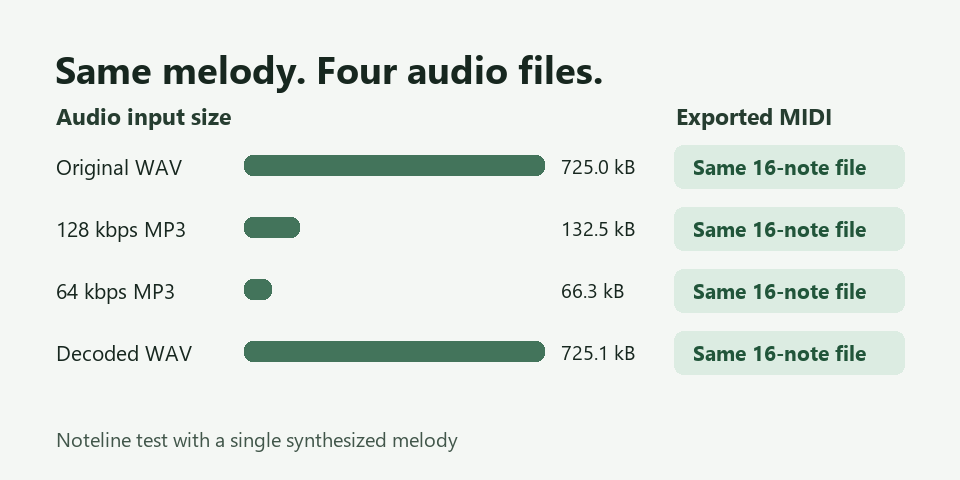
The MIDI comparison included every note start, end and velocity. The 64 kbps file and its decoded WAV had the same events as the original PCM WAV. In this test the change of audio format left both the note events and the exported file bytes identical.
Every export still started its first note at 114.583 milliseconds, compared with the reference at 120 milliseconds. The largest onset error against the reference was about 5.4 milliseconds for each input. This is a shared transcription error even though the four exports match each other.
Run the same comparison
- Original PCM WAV
- 128 kbps MP3
- 64 kbps MP3
- WAV decoded from the 64 kbps MP3
- Shared MIDI output and per-note comparison CSV
Open the MP3 to MIDI converter and run the original WAV, the two MP3 files and the decoded WAV one at a time. The reference CSV keeps each input and note number on its own row, so you can check whether a mismatch comes from pitch, start time, end time or velocity.
First compare the two MP3 files against the original WAV to see whether encoding changed the MIDI. Then compare the 64 kbps MP3 against the WAV decoded from it. Keeping those comparisons separate helps isolate any difference caused by the decoding route.
If your file utility can compare checksums, matching SHA-256 hashes are a quick way to verify identical downloads. If hashes differ, open both files and check the notes before treating the difference as a transcription change. A difference in MIDI metadata can also change the hash.
Finally compare each export against the reference onsets. If the exports agree with each other but disagree with the reference, switching among those tested inputs has left that error in place. On this melody, checking only the exported files against each other would hide the shared early start.
Apply it to a recording you care about
Use a short section containing an actual problem, such as a soft attack that goes missing. If both originals are available, take that same section from each. Run them in the same converter and compare the first differing event before you quantize or repair the clip.
If you have the original recording and want to test MP3 encoding itself, trim the original once and make every test input from that clip. Trimming the encoded copies separately can move their start points and make an editing difference look like a format difference.
Decoding your only MP3 to WAV can help when an editor or converter has trouble opening the MP3. It cannot restore sound information removed during the earlier MP3 encode.
The test used one clean synthesized melody on one converter and browser. If a file has overlapping instruments, a noisy recording or weak attacks, audition its own results before deciding which copy to keep.
For more ways to find the first error, see how to check MP3 to MIDI accuracy.